

QR codes show up everywhere now — event badges, asset labels, restaurant menus, packaging, marketing campaigns — and manually generating and placing them one at a time doesn't scale past a handful of items. This guide covers how to generate QR codes via API, so every badge, label, or document gets a correct, freshly generated code automatically, with no manual QR generation step in your workflow.
In this article
- Common use cases for QR code APIs
- Generating QR codes as standalone images
- Embedding dynamic QR codes in PDFs
- Dynamic vs. static QR codes: which do you need?
- Best practices for QR code size and placement
- FAQ
Common Use Cases for QR Code APIs
Before picking a tool, it helps to know which category your use case falls into, since that determines whether you need image-based or document-based QR generation:
- Badges and access passes — event check-in, employee IDs, conference badges
- Asset and inventory labels — equipment tracking, warehouse stock, shipping labels
- Marketing materials — packaging, posters, print ads linking to a landing page
- Documents — invoices, tickets, menus, and reports with an embedded scan-to-verify or scan-to-pay code
Generating QR Codes as Standalone Images
For badges, labels, and marketing graphics, you typically want a QR code rendered as part of a designed image — not a bare QR code alone. APITemplate.io's Image Template Editor includes a native QR code element type alongside text, images, and barcodes: you build a template (a badge layout, an asset label, a ticket design) with a QR code placeholder, then generate variations by passing different data through the API.
Generate branded QR codes for badges, labels, tickets, and marketing materials from reusable templates via API.
Each dynamic element in the template has a name — for example, qr_data — which becomes the key you reference in your JSON payload when calling the API. A typical request looks like this:
curl -X POST "https://rest.apitemplate.io/v2/create-image?template_id=YOUR_TEMPLATE_ID" \
  -H "X-API-KEY: YOUR_API_KEY" \
  -H "Content-Type: application/json" \
  -d '{
    "qr_data": "https://example.com/badge/attendee-4821",
    "attendee_name": "Jordan Ellis"
  }'
The response returns a URL to the generated PNG, with the QR code rendered directly from the qr_data value — no separate QR generation step or third-party library required.
Embedding Dynamic QR Codes in PDFs
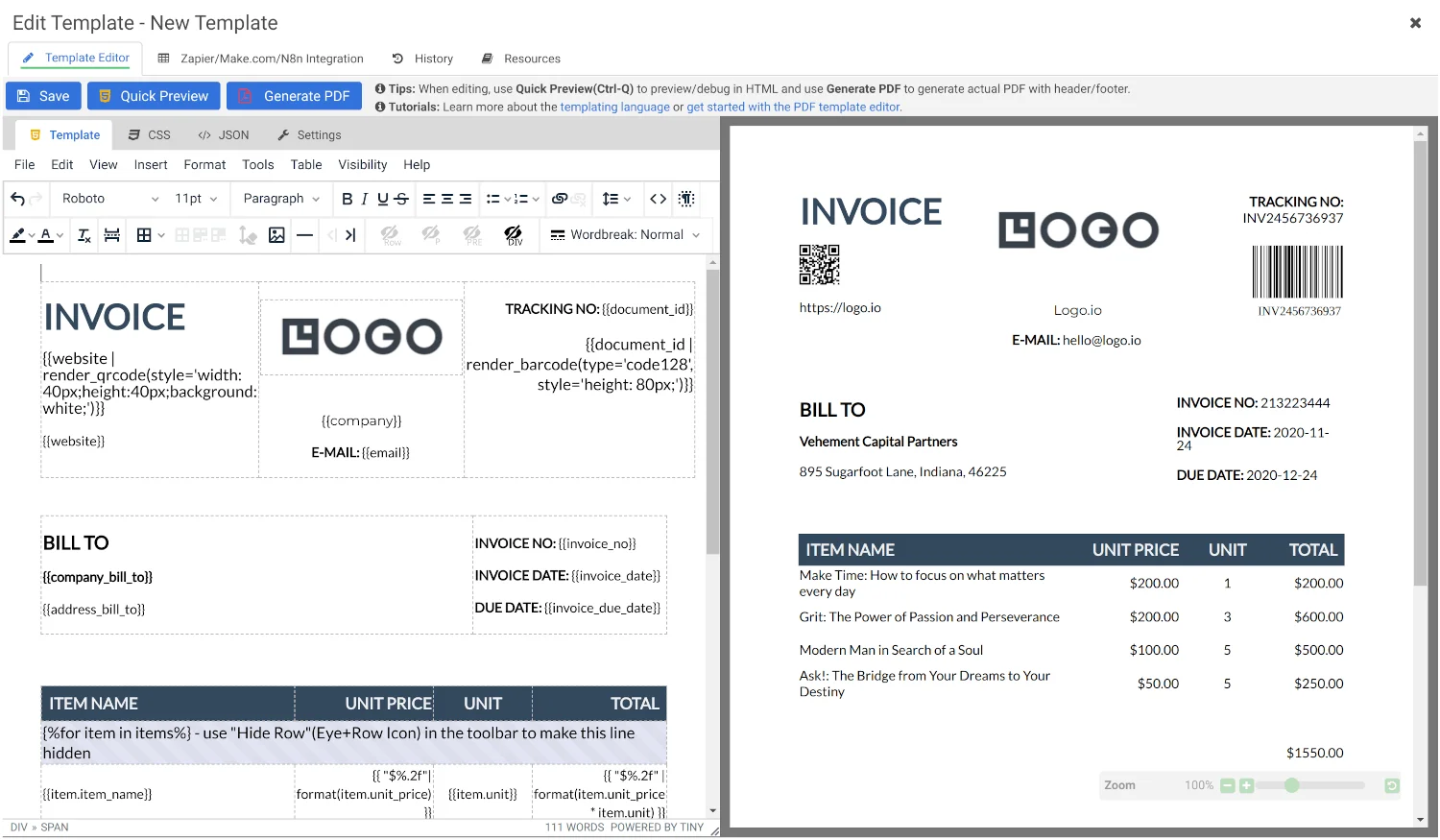
For documents — invoices, tickets, reports — QR codes need to live inside a PDF rather than as a standalone image. There are two common approaches here: rendering the QR code with a JavaScript library inside your HTML/CSS PDF template, or using a built-in render function that generates the code directly from a data field at PDF creation time. The built-in approach is generally simpler to maintain, since it avoids bundling and managing a separate QR-rendering library inside your template.
Either way, the underlying pattern is the same as with images: your template has a QR placeholder bound to a field name, and every generated PDF gets a fresh, correct code based on the data you pass in that request — whether that's a payment link, a verification ID, or a tracking number.
Dynamic vs. Static QR Codes: Which Do You Need?
This distinction matters for how you architect the system:
- Static QR codes encode the final content directly in the code itself. Once generated, they can't be updated — if the underlying URL or data changes, you need a new code.
- Dynamic QR codes point to a redirect URL you control, so you can update where it leads after the fact, and often track scan analytics. This is the better fit if content might change (e.g., a restaurant updating a daily specials menu) or if you want to know how often a code gets scanned.
If you're generating QR codes via a template-based API purely for a fixed piece of data — an invoice number, a fixed asset ID — static is usually sufficient. If you need scan tracking or post-generation updates, you'll want to pair your API-generated QR code with a dynamic-redirect service.
Best Practices for QR Code Size and Placement
- Maintain contrast. Dark code on a light background scans far more reliably than the reverse or low-contrast color combinations.
- Size for scan distance. A code meant to be scanned from a phone at arm's length needs less size than one printed on a poster meant to be scanned from several feet away.
- Leave a quiet zone. QR codes need a margin of blank space around them to scan reliably — don't crowd the code with text or other design elements.
- Test on real devices before mass-printing. Screen previews don't always reflect print scan reliability, especially at small sizes.
Bottom Line
Generating QR codes via API comes down to picking the right output format for your use case — standalone image for badges and labels, embedded PDF for documents — and binding the code to a dynamic data field so every generated asset is automatically correct. Once that's set up, adding a new badge, label, or document requires zero manual QR generation.
Frequently Asked Questions
Can I generate a QR code and image together in one API call?
Yes. Template-based image APIs let you embed a QR code as one element within a larger designed template — a badge, label, or ticket — so both the QR code and surrounding design come back in a single generated image.
What's the difference between generating a QR code for an image vs. a PDF?
Image-based QR generation uses a native QR element in the image template editor. PDF-based QR generation typically uses either a JavaScript rendering library inside the HTML template or a built-in render function — the end result is the same, but the technical path differs by output format.
Do I need a dynamic QR code, or is static enough?
Static is enough if the underlying data never changes after generation. If you need to update the destination later or track scan analytics, use a dynamic QR code that redirects through a URL you control.
Can QR codes be customized with brand colors or a logo?
Some template-based QR components support custom colors, dot styles, corner squares, and embedded logos, so the code can match your brand rather than defaulting to plain black-and-white.
Generate Your First QR Code via API
Build a badge, label, or ticket template and generate QR codes automatically — free to start.
Try It Free →

Comments (0)
Leave a Comment