
To auto-generate dynamic Open Graph (OG) images, you build a single template with placeholders for the content that changes per page, such as a title or author name, then call an image generation API at request time (or at build time) to render a unique image for every URL. Tools like Bannerbear handle the template and rendering side, so you only need to pass in the dynamic values and point your page's meta tags at the returned image URL. This guide walks through why dynamic OG images matter and how to set the workflow up.
In this article
- What is an OG image, and why does it matter?
- Static vs dynamic OG images
- How to set up dynamic OG image generation
- Adding the image to your page's meta tags
- Other ways to generate OG images
- FAQ
What is an OG image, and why does it matter?
An Open Graph image is the preview image that shows up when a page is shared on platforms like Twitter/X, LinkedIn, Facebook, or Slack. It's controlled by the og:image meta tag in a page's HTML head. A strong OG image increases click-through rates on shared links, since it gives people visual context before they even land on the page.
The problem is scale. A blog with hundreds of posts, a job board with dozens of open roles, or a SaaS product with per-user shareable pages all need a unique, relevant image for every single URL. Designing each one by hand isn't realistic once volume grows past a handful of pages.
Static vs dynamic OG images
A static OG image is one fixed image reused across every page, usually a logo or generic brand graphic. It's easy to set up but gives every shared link the exact same preview, regardless of what the content actually is.
A dynamic OG image is generated per page, typically pulling in that page's title, author, category, or featured image into a consistent branded template. This is what lets a blog show a different, relevant preview image for every post without a designer manually creating each one.
How to set up dynamic OG image generation
The overall workflow has three parts: a template, a data source, and a trigger that calls the API.
Step 1: Build a template with dynamic fields
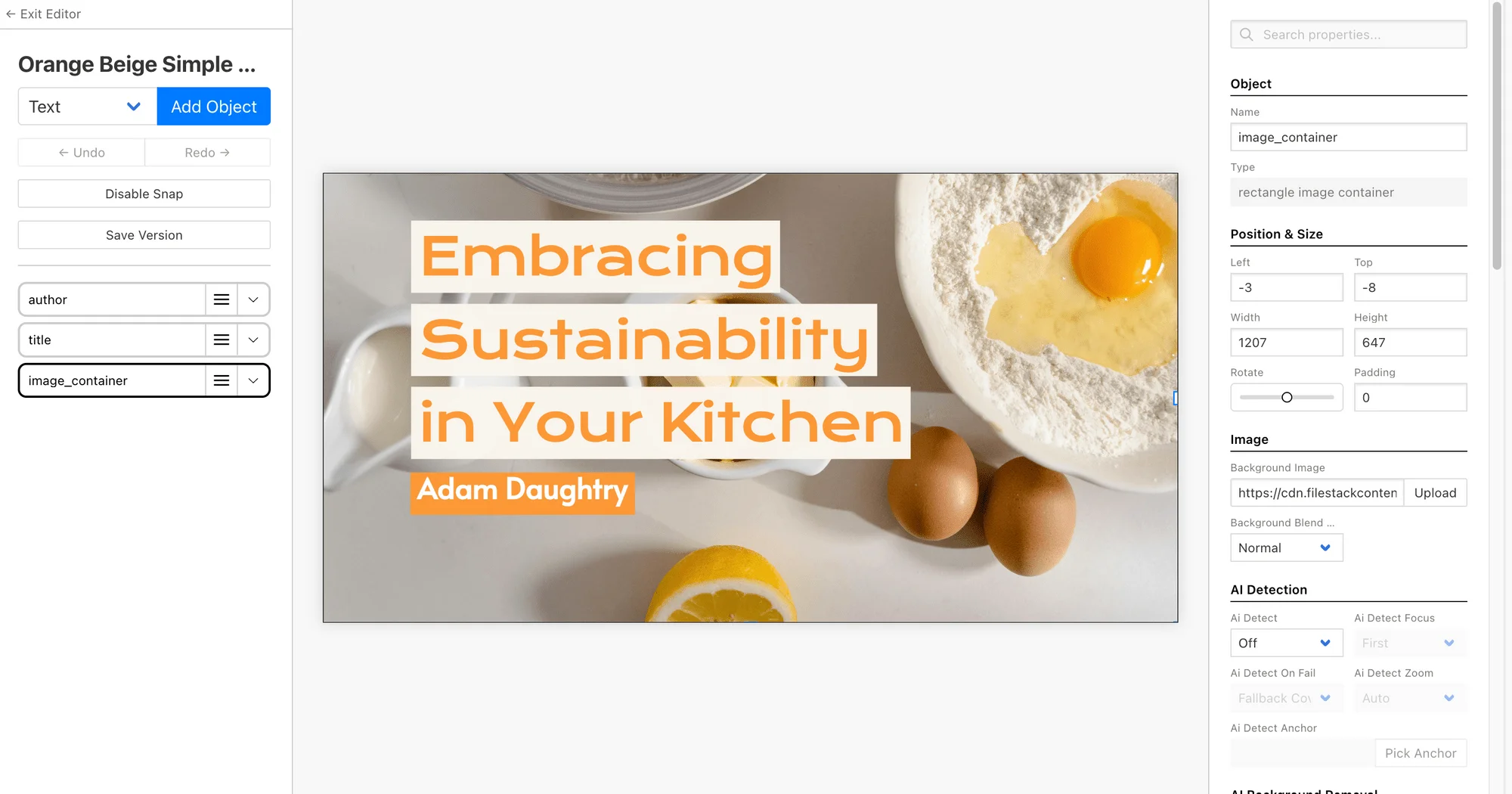
Using a tool like Bannerbear, design your OG image layout once in the visual editor and mark the fields that should change per page, such as the post title, author name, and category label, as dynamic. Everything else (fonts, colors, logo placement) stays fixed, so every generated image is visually consistent.
Step 2: Call the API with your page's data
Whenever a new page is published, or whenever a page is requested for the first time, send a request to the image generation API with that page's specific values filled into the template's dynamic fields. Most APIs, including Bannerbear's, return either the finished image directly or a URL where it will be available once rendering completes. The exact request format and parameter names differ by provider, so check your chosen tool's documentation for specifics.
// Illustrative example only, check your provider's docs for exact syntax
POST /images
{
  "template": "og-image-blog",
  "modifications": [
    { "field": "title", "text": pageTitle },
    { "field": "author", "text": pageAuthor }
  ]
}
// Response includes a URL to the generated image
Step 3: Store or cache the generated image URL
Rather than generating a new image every time a page is shared, generate it once (typically when the page is published or first built) and store the resulting image URL alongside your page's other metadata. This avoids unnecessary API calls and keeps page load fast.

Adding the image to your page's meta tags
Once you have a generated image URL for a page, reference it in that page's <head> using the standard Open Graph and Twitter Card tags:
<meta property="og:image" content="https://your-generated-image-url" />
<meta name="twitter:card" content="summary_large_image" />
<meta name="twitter:image" content="https://your-generated-image-url" />
Most static site generators and CMS platforms let you inject these tags dynamically per page, pulling the stored image URL from your content data rather than hardcoding it.
Other ways to generate OG images
Bannerbear is a strong fit for this workflow because of its template editor and bulk generation support, which matters if you're backfilling OG images for an existing library of pages. Other template-based APIs like Placid and Renderform can achieve a similar result, and some frameworks (like certain static site generator plugins) offer built-in, code-based OG image generation for teams that prefer to avoid a third-party API entirely.
Frequently asked questions
What is a dynamic OG image?
A dynamic OG image is a social share preview image generated automatically per page, pulling in that page's specific title or content into a consistent branded template, instead of reusing one static image across an entire site.
Do I need to regenerate the OG image every time a page is shared?
No. The image should be generated once, typically when the page is published, and the resulting URL stored and reused. Regenerating on every share adds unnecessary latency and API usage.
Which meta tags do I need for OG images?
At minimum, the og:image tag for Open Graph platforms like Facebook and LinkedIn, plus twitter:card and twitter:image tags if you want a large image preview on Twitter/X.
Can I generate OG images in bulk for an existing site?
Yes. Tools like Bannerbear support bulk generation, so you can send data for every existing page in one batch and backfill dynamic OG images across your entire site without generating them one at a time.
Ready to automate your OG images?
Set up a template once and let Bannerbear generate a unique, on-brand share image for every page.
Try Bannerbear free →No credit card required to start.


Comments (0)
Leave a Comment